MÉTODOS DE PAGAMENTO
Método de pagamento
Comissão
Prazo
Mínimo
Máximo
Informação
COMO DEPOSITAR NA IGNITION?
Depositar na Ignition é simples e seguro.
Em poucos passos, você faz a transação com o seu método de pagamento preferido
e começa a jogar logo em seguida.
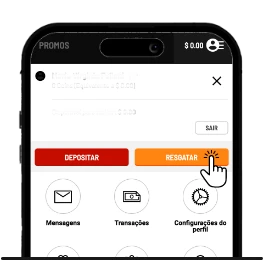
1. ENTRE NA SUA CONTA
Crie uma conta ou faça login. No menu, selecione “Depositar”.
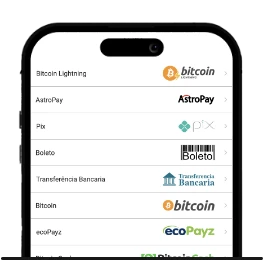
2. ESCOLHA O MÉTODO
Selecione uma das opções de método de depósito.
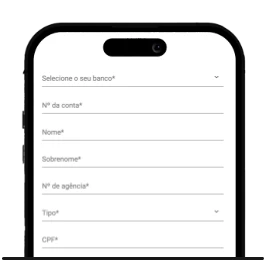
3. INSIRA OS DADOS E CONFIRME
Preencha o formulário e o valor do depósito. Se estiver tudo certo, clique em “depositar” para concluir.
PIX É O MÉTODO FAVORITO DOS JOGADORES
Simples, seguro e com processamento instantâneo, o Pix é o método de pagamento mais utilizado entre os nossos jogadores.
Veja como é fácil depositar com Pix na Ignition:
Acesse sua conta e vá até o Menu
Clique em “Depositar” e selecione “Pix”
Escolha ou insira o valor desejado e clique em “Continuar”
Confirme a transação acessando o aplicativo do seu banco
1
Acesse sua conta e vá até o Menu
2
Clique em “Depositar” e selecione “Pix”
3
Escolha ou insira o valor desejado e clique em “Continuar”
4
Confirme a transação acessando o aplicativo do seu banco
SAQUE SEM TAXA NA IGNITION
Na Ignition, você saca seu saldo de forma segura e sem custos adicionais.
Antes de realizar o saque, verifique se atende aos requisitos:

Se você depositar e jogar sem bônus precisa apostar pelo menos 100% do valor depositado.
Se você depositar com um bônus precisará cumprir o requisito de Rollover exigido nas promoções de Casino.
Rollover é a condição que deve ser cumprida para liberar o bônus e os ganhos.
Verifique as condições de Rollover nos Termos e Condições do bônus selecionado.
1. ENTRE NA SUA CONTA
Crie uma conta ou faça login. No menu, selecione “Resgatar”.
2. ESCOLHA O MÉTODO
Selecione uma das opções de método de saque. Fique de olho nos prazos e taxas de cada operação.
3. INSIRA OS DADOS E CONFIRME
Preencha o formulário e o valor do resgate. Se estiver tudo certo, clique em “Solicitar resgate” para concluir.
Após a aprovação da sua solicitação, você verá o número de referência e os detalhes do saque.
Antes de solicitar, tenha em mente alguns detalhes:

Para garantir a segurança do saque, podemos solicitar documentos para validação.
O valor será deduzido do saldo da sua conta Ignition após a aprovação.
A revisão dos saques leva cerca de 24 a 48 horas e o prazo de compensação varia conforme o método de saque escolhido.
COMO OS JOGADORES ESTÃO FAZENDO SAQUES NA IGNITION?

PIX
Simples, rápido e seguro, com processamento instantâneo

TRANSFERÊNCIA BANCÁRIA
Ideal para grandes quantias, com processamento entre 2 a 5 dias úteis

E-WALLETS
Rápido e conveniente, com processamento em até 24h

CRIPTOMOEDAS
Seguro e anônimo, com processamento em 24 horas.